
Product repository: INNO-MAKER/CAM-IMX335-5MP
CAM-IMX335-5MP
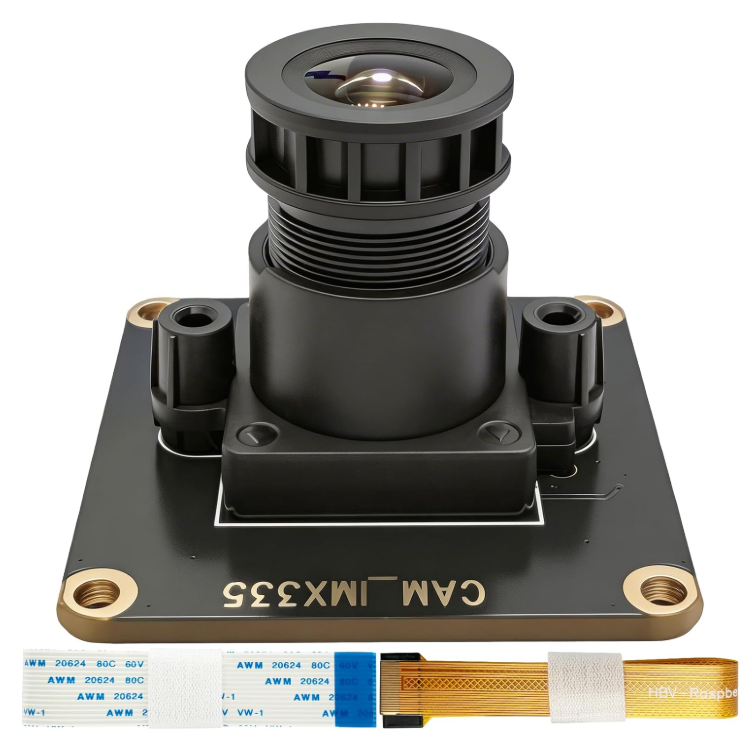
The CAM-IMX335-5MP is a high-performance 5-Megapixel camera module designed for Raspberry Pi, featuring the Sony IMX335 image sensor. This repository provides the necessary drivers, Image Processing Algorithm (IPA) modules, and installation scripts to enable full support for the IMX335 sensor on Raspberry Pi 4 and Raspberry Pi 5 platforms.
Features
- Sensor: Sony IMX335 5MP CMOS Image Sensor
- Compatibility: Fully compatible with Raspberry Pi 4 and Raspberry Pi 5
- Software Support: Integrates with the official
libcamerastack andrpicam-apps - Installation: Provides pre-compiled IPA, offline, and online installation methods
Repository Contents
| File / Folder | Description |
|---|---|
precompiler/ | Pre-compiled IPA modules for specific OS versions (fastest setup) |
build_offline_complete.tar.gz | Offline build package (libcamera + rpicam-apps source) |
build_online_complete.tar.gz | Online build script |
CAM-IMX335-5MP.pdf | Comprehensive user manual |
images/ | Product images |
Quick Start
1. Hardware Connection
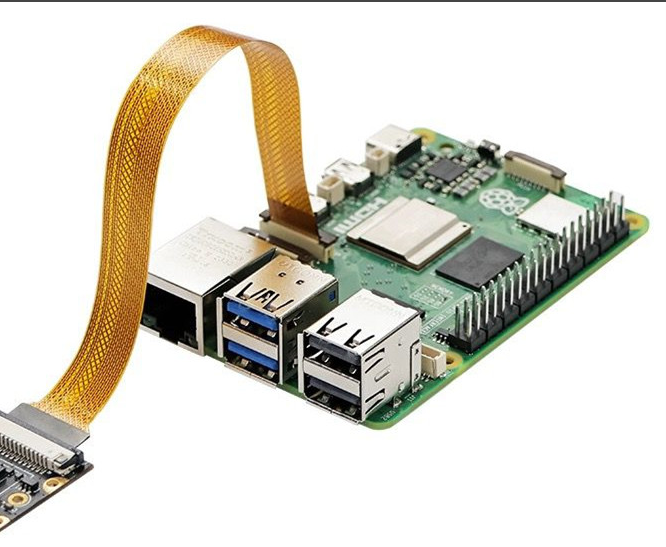
Connect the CAM-IMX335-5MP module to the MIPI CSI camera port on your Raspberry Pi using the provided FPC ribbon cable. Ensure the contacts are facing the correct direction according to your Raspberry Pi model.
2. Software Installation
Three installation methods are available. Option A is recommended for the fastest setup.
Option A: Pre-compiled IPA Installation (Recommended)
Important Notice: Pre-compiled IPA packages are built for specific OS versions and kernel versions. Before installation, please verify that your system matches exactly. If your OS version is not listed below, use Option B or C instead.
Supported Versions:
| Package | OS | Platform | Date |
|---|---|---|---|
imx335_ipaonly_trixie_pi5_20260509-171204.tar.gz | Raspberry Pi OS Trixie | Pi 5 | 2026-05-09 |
Check your system version before installation:
# Check OS version
cat /etc/os-release

# Check kernel version
uname -r
Installation:
# Clone the repository
git clone https://github.com/INNO-MAKER/CAM-IMX335-5MP.git
cd CAM-IMX335-5MP

# Extract the matching pre-compiled IPA package
tar -xzf precompiler/imx335_ipaonly_trixie_pi5_20260509-171204.tar.gz

# Run the installation script
chmod +x install.sh
sudo ./install.shNote: More pre-compiled packages for additional OS versions will be added as testing is completed. If your OS version is not listed, please use Option B (offline compilation).
Option B: Offline Compilation (Source Build)
Use this option if your OS/kernel version is not listed in the pre-compiled packages above.
Update system packages:
bashsudo apt-get update sudo apt-get dist-upgradeClone the repository:
bashgit clone https://github.com/INNO-MAKER/CAM-IMX335-5MP.git cd CAM-IMX335-5MPSet permissions and extract the offline build package:
bashsudo chmod -R a+rwx * sudo tar -zxvf build_offline_complete.tar.gz cd build_offline_completeRun the build and installation script:
bashsudo ./build_offline_complete_trixie.sh
Build Time: The script will compile libcamera with IMX335 IPA support and install rpicam-apps. This may take 30-60 minutes depending on your hardware.
Option C: Online Compilation
For users with a stable internet connection who prefer to build from the latest sources:
git clone https://github.com/INNO-MAKER/CAM-IMX335-5MP.git
cd CAM-IMX335-5MP
sudo tar -zxvf build_online_complete.tar.gz
cd build_online_complete
sudo ./build.sh3. Camera Configuration
Edit your /boot/firmware/config.txt (Pi 5) or /boot/config.txt (Pi 4) and add one of the following configurations:
Default (CSI1 port):
camera_auto_detect=0
dtoverlay=imx335
Use CSI0 port:
camera_auto_detect=0
dtoverlay=imx335,cam0
Use CSI1 port (explicit):
camera_auto_detect=0
dtoverlay=imx335,cam1
Reboot your Raspberry Pi for the changes to take effect:
sudo reboot4. Testing the Camera
After installation and rebooting, you can test the camera using the standard rpicam-apps:
# List available cameras to verify detection
rpicam-hello --list-cameras

# Open a preview window
rpicam-hello -t 0

# Capture a JPEG image
rpicam-still -o test.jpg

# Record a video
rpicam-vid -t 5000 -o test.h264
```

---

## Preset OS Image

A pre-configured Raspberry Pi OS image with all drivers and software pre-installed is available for download:

**Download**: [https://www.jianguoyun.com/p/DWqJpGAQpdSrBxil9p8GIAA](https://www.jianguoyun.com/p/DWqJpGAQpdSrBxil9p8GIAA)
**Password**: `exgk55`

---

## Documentation

For detailed specifications, advanced configuration, and troubleshooting, please consult the [CAM-IMX335-5MP.pdf](https://raw.githubusercontent.com/INNO-MAKER/CAM-IMX335-5MP/main/CAM-IMX335-5MP.pdf).