
Product repository: INNO-MAKER/CAM-IMX577
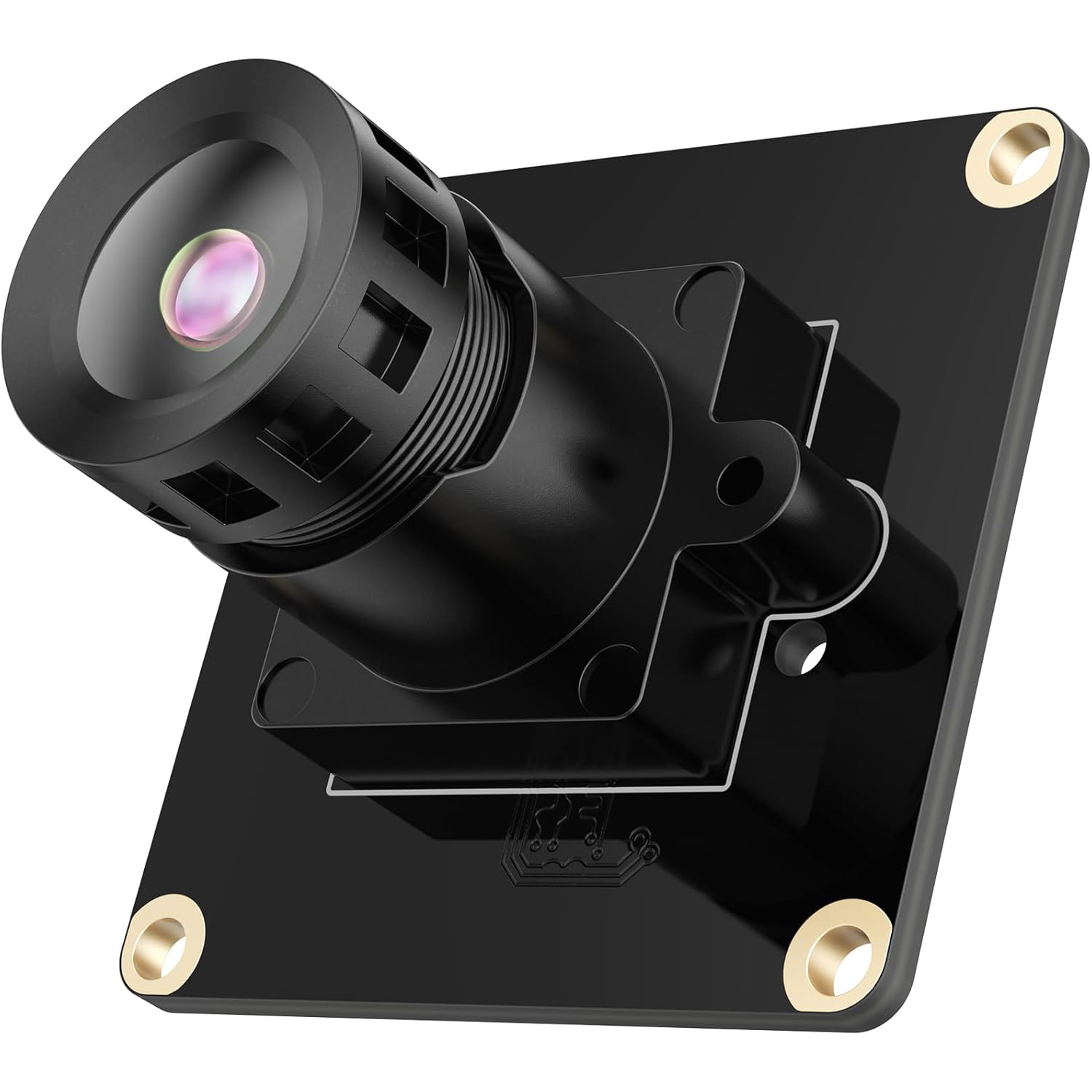
CAM-IMX577 12MP MIPI Camera Module
1. Product Overview
The CAM-IMX577 is a high-performance 12.3MP MIPI CSI-2 camera module featuring the Sony IMX577 (IMX477 variant) back-illuminated CMOS sensor. Designed for professional imaging applications on Raspberry Pi 5 and other embedded Linux systems, it delivers exceptional image quality with support for multiple video formats ranging from Full HD to 4K UHD.
With a 1/2.3" optical format, 1.55μm pixel size, and RGGB Bayer pattern, the CAM-IMX577 provides excellent low-light performance, high dynamic range support, and flexible RAW output options (8-bit, 10-bit, 12-bit). The module is fully compatible with the libcamera ecosystem and supports offline compilation for maximum flexibility.
1.1 Key Features
- 12.3MP High Resolution with 4056 × 3040 native resolution
- Back-illuminated CMOS Sensor for exceptional low-light performance
- RGGB Bayer Pattern for full-color imaging
- Multiple RAW Output Formats (8-bit, 10-bit, 12-bit)
- Flexible Video Formats - Full resolution to low-power modes
- MIPI CSI-2 4-lane high-speed interface
- On-board Calibration Support via I2C EEPROM
- Compatible with Raspberry Pi 5 and Linux-based embedded systems
1.2 Industry Applications
- Professional Photography & Videography
- Security & Surveillance Systems
- Industrial Machine Vision
- Drone & UAV Imaging
- Scientific & Research Imaging
- Automotive Vision Systems
2. Hardware Specifications
2.1 Sensor Specifications
| Parameter | Specification |
|---|---|
| Product Model | CAM-IMX577 |
| Sensor Model | Sony IMX577 (IMX477 variant) |
| Sensor Type | CMOS Image Sensor (Back-illuminated) |
| Resolution | 12.3 Megapixels |
| Max Resolution | 4056 × 3040 pixels |
| Optical Format | 1/2.3" |
| Pixel Size | 1.55μm × 1.55μm |
| Pixel Layout | RGGB (Bayer Pattern) |
| Dynamic Range | High-performance WDR support |
| Low-light Performance | Excellent (back-illuminated technology) |
| Shutter Type | Rolling shutter |
2.2 Video Format & Resolution
| Pixel Format | Resolution | Description |
|---|---|---|
| SRGGB12_CSI2P | 4056 × 3040 | 12-bit RAW Full Resolution |
| SRGGB12_CSI2P | 4056 × 2160 | 12-bit RAW 4K UHD |
| SRGGB12_CSI2P | 2028 × 1520 | 12-bit RAW 2K |
| SRGGB12_CSI2P | 2028 × 1080 | 12-bit RAW Full HD |
| SRGGB12_CSI2P | 1332 × 990 | 12-bit RAW Low Power |
| SRGGB10_CSI2P | 4056 × 3040 | 10-bit RAW Full Resolution |
| SRGGB8 | 4056 × 3040 | 8-bit RAW Full Resolution |
Note: The 12-bit RAW format provides maximum dynamic range and post-processing flexibility.
2.3 Interface & Physical Specifications
| Parameter | Specification |
|---|---|
| Interface Type | MIPI CSI-2 |
| Data Lanes | 2-lane |
| Connector | 22-pin 0.5mm Pitch FPC / 15-pin 1.0mm Pitch FPC |
| Dimensions | 38mm × 38mm |
| Lens Mount | CS-mount / M12 |
2.4 Strobe & XVS (Vertical Sync) Output
The CAM-IMX577 provides two hardware synchronization signal pads on the PCB:
- Strobe: A flash/strobe trigger output signal that pulses in sync with each exposure. It can be used to drive an external LED flash or strobe light, ensuring the illumination is precisely aligned with the camera's exposure window.
- XVS (Vertical Sync): The vertical synchronization signal output from the Sony IMX577 sensor. XVS pulses once per frame at the start of each vertical blanking period, making it ideal for multi-camera synchronization, external trigger coordination, and precise frame timing.
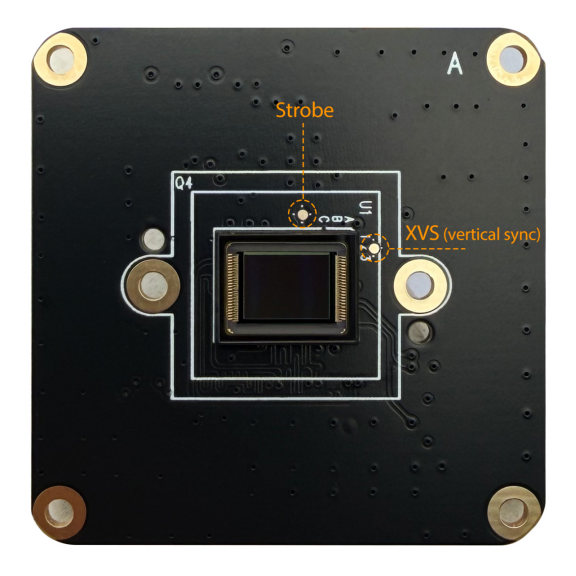
Note: Both Strobe and XVS are exposed as solder pads on the PCB (as shown in the image above). They are intended for advanced users who require hardware-level synchronization.
3. Software Support
3.1 Repository Contents
This repository provides product documentation, camera configuration guidance, compatible lens information, hardware reference images, and two Raspberry Pi 5 pre-built driver bundles for CAM-IMX577.
CAM-IMX577/
├── README.md
├── raspberry_pi_driver/
│   └── precompiler-driver/                                      ← Raspberry Pi 5 pre-built driver bundles
├── camera_lens/                                                  ← Compatible lens documentation
└── images/                                                       ← Hardware reference images
Available Resources:
raspberry_pi_driver/precompiler-driver/- Pre-built Raspberry Pi 5 driver bundles for the OS and kernel combinations listed belowcamera_lens/- Compatible lens specifications and documentation
3.2 Raspberry Pi 5 Pre-built Driver Bundles
| Package | Target system | Required libcamera ABI |
|---|---|---|
imx577_bookworm_pi5_k6.12.75+rpt-rpi-2712_20260616-134821.tar.gz | Raspberry Pi 5 · Debian Bookworm 12 · kernel 6.12.75+rpt-rpi-2712 | libcamera.so.0.5 / libcamera-base.so.0.5 |
imx577_trixie_pi5_k6.12.75+rpt-rpi-2712_20260418-201631.tar.gz | Raspberry Pi 5 · Debian Trixie 13 · kernel 6.12.75+rpt-rpi-2712 | libcamera.so.0.6 / libcamera-base.so.0.6 |
Each bundle contains the pre-built camera kernel module, IMX577 device-tree overlay, and matching package components. Select the bundle that matches the target operating system, exact kernel release, and libcamera ABI. Refer to the README.md and MANIFEST inside the selected archive before installation.
For other platforms, kernel versions, standalone runtime packages, or source access, contact support@inno-maker.com or sales@inno-maker.com with the target hardware and software version details.
3.3 Manual Configuration
Edit your /boot/firmware/config.txt and add one of the following:
For CAM0 port:
camera_auto_detect=0
dtoverlay=imx577-overlay,cam0
For CAM1 port:
camera_auto_detect=0
dtoverlay=imx577-overlay,cam1
Reboot your Raspberry Pi for the changes to take effect:
sudo reboot4. Testing the Camera
After installation and rebooting, verify the camera detection and test functionality using rpicam-apps.
4.1 Verify Detection
List available cameras:
rpicam-hello --list-cameras4.2 Capture Commands
Live Preview:
rpicam-hello -t 0Capture Full Resolution Image (12MP):
rpicam-still -o 12mp_image.jpg --width 4056 --height 3040Capture 4K Image:
rpicam-still -o 4k_image.jpg --width 4056 --height 2160Record 4K Video:
rpicam-vid -t 10000 --width 4056 --height 2160 -o 4k_video.h264Capture 12-bit RAW:
rpicam-raw -t 5000 --width 4056 --height 3040 -o raw_image.dng5. Compatible Lenses
The camera module supports multiple lens options for different applications:
- D1326 Lens - Standard lens configuration (see
camera_lens/D1326镜头.pdf) - YT10089 8MP+ Lens - High-performance lens with IR-CUT filter (see
camera_lens/YT10089-8MP+H93+IR0160(01.10089.014.08)-8MP座子是IR-CUT.pdf)
For lens selection and compatibility details, refer to the lens documentation in the camera_lens/ directory.
6. Preset OS Image
A pre-configured Raspberry Pi OS image with all drivers and software pre-installed is available for download:
Download: https://www.jianguoyun.com/p/DWqJpGAQpdSrBxil9p8GIAA
Password: exgk55
7. Support
For technical support, product inquiries, and source code access requests, please visit:
- Website: www.inno-maker.com
- GitHub: github.com/INNO-MAKER
- Email: support@inno-maker.com | sales@inno-maker.com